Project-based learning, made visible

Turn project work into proof of learning.

Learners connect their real project work to their Learning Outcomes and explain what it shows, while teachers follow along with feedback all year, not just at the deadline.

TrymoApplied Computer Science 2026–27

Learning Outcome

Designs the architecture of a software system

Sam PeetersFeedback requested

Rationale

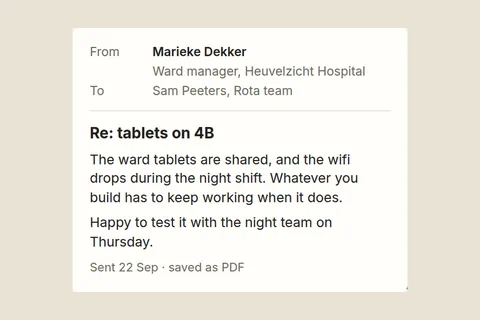
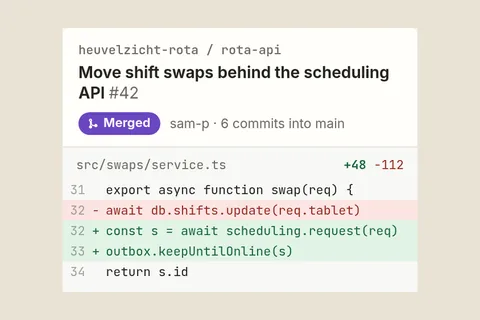
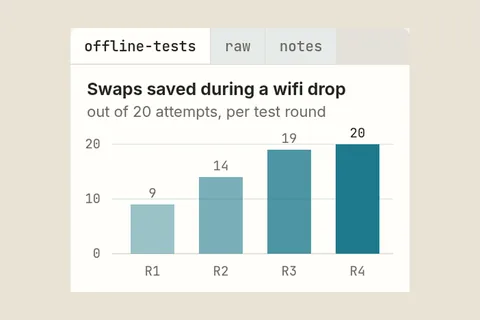
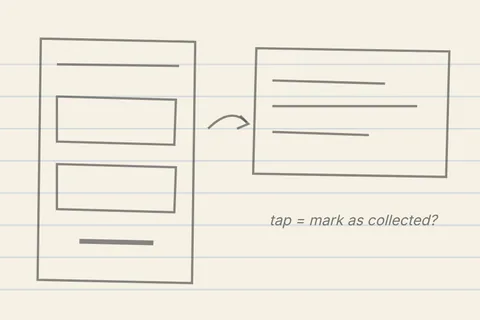
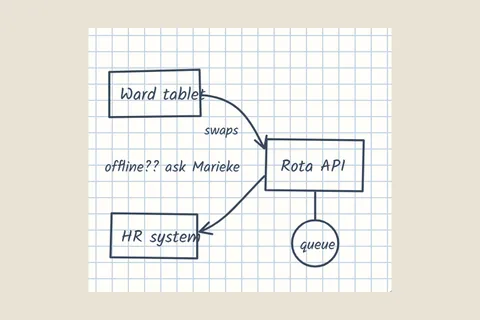
I split the rota app into a scheduling API and a client for the shared ward tablets, because the wifi on 4B drops at night F. My first sketch C became pull request #42 A, and in test round 4 every swap was saved during a drop D.

Evidence 6

  • ASwaps behind the scheduling APILink · Team
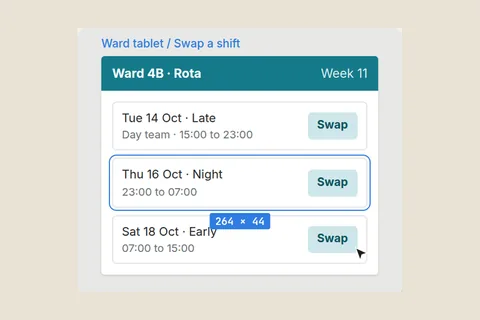
  • BSwap screen for ward tabletsLink · Team
  • CFirst split, whiteboardFile · Personal
  • DOffline swap test roundsFile · Team
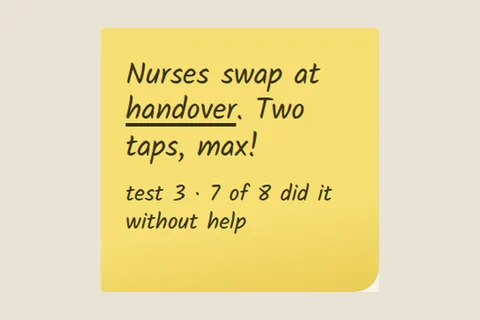
  • EHandover test with nursesNote · Personal
  • FWard manager on shared tabletsFile · Team

Where it stands

Sam asked Lien Peeters, his teacher, to look. Sam sees her indication as soon as she gives it.
Where the work actually lives

Gathered into one Learning Outcome

A
heuvelzicht-rota / rota-api
Move shift swaps behind the scheduling API #42
Mergedsam-p · 6 commits into main
src/swaps/service.ts+48 −112
31export async function swap(req) {
32- await db.shifts.update(req.tablet)
32+ const s = await scheduling.request(req)
33+ outbox.keepUntilOnline(s)
34 return s.id
GitHub · pull request
BWard tablet / Swap a shift
Ward 4B · Rota Week 11
Tue 14 Oct · LateDay team · 15:00 to 23:00
Swap
Thu 16 Oct · Night23:00 to 07:00
Swap
Sat 18 Oct · Early07:00 to 15:00
Swap
Figma · shared link
CPhone photo · IMG_2214.jpg
E

Nurses swap at handover. Two taps, max!

test 3 · 7 of 8 did it without help

Workshop table
F
FromMarieke DekkerWard manager, Heuvelzicht HospitalToSam Peeters, Rota team
Re: tablets on 4B

The ward tablets are shared, and the wifi drops during the night shift. Whatever you build has to keep working when it does.

Happy to test it with the night team on Thursday.

Sent 22 Sep · saved as PDF

Email from the Project Partner
D
offline-testsrawnotes
Swaps saved during a wifi drop

out of 20 attempts, per test round

010209R114R219R320R4Spreadsheet · offline-tests.xlsx
Six pieces of work from six places. One Learning Outcome.

What changes

Less chasing, fewer surprises, more learning you can see.

Here's what that looks like over one term, with a learner called Sam and his teacher, Lien.

No more portfolios pieced together in the final week

The portfolio builds itself while the project runs.

Learners add a sketch, an email, a test result or a link on the day it happens and connect it to the outcome it shows. By the time they write their rationale, the proof is already there.

Evidence library6Sam Peeters
  • First split, whiteboardFile · 10 SepCited
  • Ward manager on shared tabletsFile · 22 SepCited
  • Swap screen for ward tabletsLink · 24 Sep
  • Swaps behind the scheduling APILink · 26 SepCited
  • Handover test with nursesNote · 29 Sep
  • Offline swap test roundsFile · 30 SepCited

For learners

Say what you learned, citing the work.

Each Learning Outcome has one page that learner and teacher share. The learner explains in a few sentences what they can do now, and every claim points to the work that shows it. Teachers read the argument and the proof together.

RationaleDesigns the architecture of a software system

I split the rota app into a scheduling API and a client for the shared ward tablets, because the wifi on 4B drops at night Ward manager on shared tablets. My first sketch First split, whiteboard became pull request #42 Swaps behind the scheduling API, and in test round 4 every swap was saved during a drop Offline swap test rounds.

Evidence set4
  • First split, whiteboardFile · 10 SepCited
  • Ward manager on shared tabletsFile · 22 SepCited
  • Swaps behind the scheduling APILink · 26 SepCited
  • Offline swap test roundsFile · 30 SepCited

For teachers

Teachers see who needs them, and who has moved on.

When learners want feedback, they ask one focused question. Your dashboard puts those questions first, along with anyone who has done new work since your last indication, so you can follow up whenever you like.

Asked for your feedbackLien Peeters
  • Sam Peetersjust nowAskedDesigns the architecture of a software system“I think the API split gets me to Proficient now. Does the offline test round convince you?”
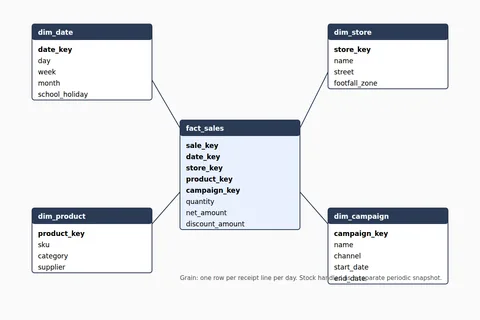
  • Leo Mertens2 daysAskedDesigns a data model for reporting“Is one row per receipt line the right grain?”
Moved on since your indication
  • Noor El AmraniAnalyses requirements · 2 days agoNew Evidence
  • Maya JanssensBuilds software in a team · 3 days agoRevised Rationale

No more surprises at the end of term

Two views, side by side, all year.

The learner's own level and the teacher's indication always sit together. When they differ, both see it straight away and can talk about it while there's still time.

Assessment
Advanced
Proficient
Developing
Beginning
LearnerTeacher

7 OctSame perspective

Lien · 7 OctRound 4 convinces me. Next, show how the API copes with a second ward.

Activity
  • Sam · 11 SepDeveloping
  • Lien · 12 SepDeveloping
  • Sam · 1 OctProficient
  • Sam · 1 OctAsked for feedback
  • Lien · 7 OctProficient

For programmes

Your programme's outcomes, across every year.

A Workspace can be a course, a semester, a year or a track that runs longer. Workspaces come and go, while what your programme promises changes far less often. Trymo keeps the two connected, so you can see how each Workspace contributes.

Programme overviewYear 1Year 2Year 3
  • PO1Designs and builds softwareY1Builds a working web appY2Designs the architecture of a software systemY2Builds software in a team
  • PO2Collaborates in a project teamY1Plans work with a teamY2Builds software in a teamY3Delivers in a professional setting
  • PO3Works with real clientsY2Works with a real clientY3Delivers in a professional setting
  • PO4Investigates a question systematicallyNothing addresses this yet

Y1Web BasicsY2Applied Computer ScienceY3Internship

Programme Outcomes that carry across years

Write down what the programme promises once, grouped the way you think about it. They carry over as Workspaces come and go, and when the programme changes, you edit them or archive the ones you no longer use.

Every Learning Outcome linked to the promise

Teachers link each Workspace's Learning Outcomes to the Programme Outcomes they support. When a Workspace is copied for next year, the links come along.

Coverage at a glance

The Programme overview shows which Workspaces address each Programme Outcome, and which outcomes nothing addresses yet.

Programme leads see the structure, never an individual learner's work.

For learners and their teachers

See each learner grow across the programme.

The Programme portfolio turns a learner's project work over the years into one picture of their strengths and growth, with their best work as proof. No averages, no rankings.

Coming next
Then and nowSam Peeters
Then · Year 1Recipe app wireframes
Now · Year 2Ward rota app, API split

“In year one I split code by screen. In the rota app I learned to split it by responsibility.”

Programme profileYear 1Year 2Year 3
Designs the architecture of a software system7 pieces of Evidence from 2 WorkspacesStrength
Builds software in a team5 pieces of Evidence from 2 Workspaces
Works with a real client3 pieces of Evidence, this year
Investigates a question systematicallyComes up in year 3

Your existing tools

Works next to what you already use.

Trymo doesn't replace your tools. The work stays where it was made, Trymo links to it, and the conversation about learning happens around it.

Where the work happens

Code repositoriesA pull requestDesign toolsA screen designShared drivesA test spreadsheetPhotos from the floorA whiteboard sketch
Trymo

Where the record lives

Your LMSStudent records

Not another LMS

Trymo links to the work where it was made. Nothing to migrate, nothing to copy.

Your outcomes, your levels

Each Workspace uses your own Learning Outcomes and your own Assessment Scale, so Trymo fits the way your programme already works.

Your data stays in the EU

Hosted in the EU, with no trackers or ads. Each Workspace is closed off from the others, and uploaded files are never public.

From the maker

Why I built Trymo.

I believe learners should have more ownership over their learning, without being left to figure everything out on their own.

As an educator, I've seen how easily freedom can turn into uncertainty when expectations, progress and evidence are not clear. At the same time, adding more structure can quickly become restrictive and take ownership away from the learner.

I want to find a better balance: clear direction without prescribing the path, and enough structure to make growth visible without reducing learning to a checklist.

That idea is at the heart of Trymo.

Vince ColsonMaker of Trymo

Try Trymo

Free while Trymo is in testing.

Trymo is in testing until early 2027. Anyone can request access and use it for free, as long as they share what works and what doesn't. You don't need your whole programme on board: one teacher is enough to start.

  1. Request access

    Tell me who you are and what you teach. I read every request myself and reply to set up your access.

  2. Your first Workspace

    Set it up with your own Learning Outcomes and Assessment Scale, and invite your learners and any fellow teachers. I'm happy to help.

  3. Use it on a real project

    Work in Trymo during a real project and say honestly what helps and what gets in the way. Trymo changes with that feedback.

Who it suits
Mainly higher education: programmes where learners work on real projects and are assessed against Learning Outcomes.
Cost
Free during the testing phase
In return
Your honest feedback

Try it for yourself.

Request access and set up Trymo with your own Learning Outcomes. It's free while Trymo is in testing.

I read every request myself and reply to set up your access.

FAQ

What educators usually ask first.